Your build was green.
The site was wrong.
A method for shipping production marketing sites, a catalogue of 45 failures that passed every check on the way out — clean build, clean types, clean deploy, wrong result — and a console that shows which checks still hold for the code as it is now.
New in 0.2.0
A build you can see, and Claude can read
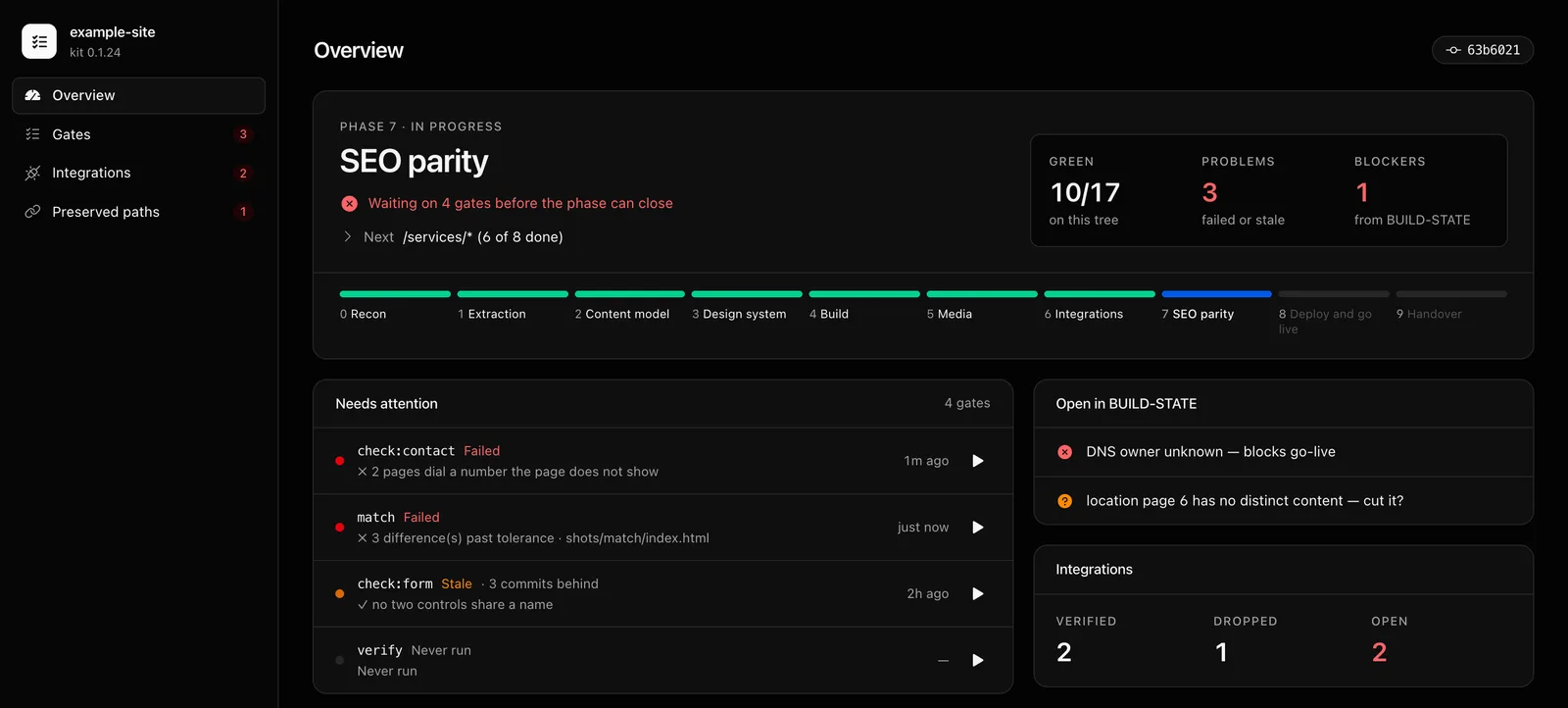
A build spans weeks and more sessions than a context window holds. The console reads where it stands from the site itself — the phase, every gate, the blockers — so nobody resumes from memory, and no tick outlives the code it vouched for.
Stale is not passed
Every gate is recorded against a fingerprint of the site as it is — committed and uncommitted. A pass on any other tree reads stale, with how many commits behind, and the phase cannot close on it.
Visual parity, worst first
match compares the rebuild with the live old site section by section, in pixels and in words, including the open menu, the hover dropdowns and the scrolled header. The worst routes come first, against the tolerance line.
Paired with Claude Code
An MCP server gives Claude the same state the page shows — kit_status, run_gate, gate_result, and make_site for an empty folder. A gate Claude runs streams onto the page live, and the page will not start a second one beside it.
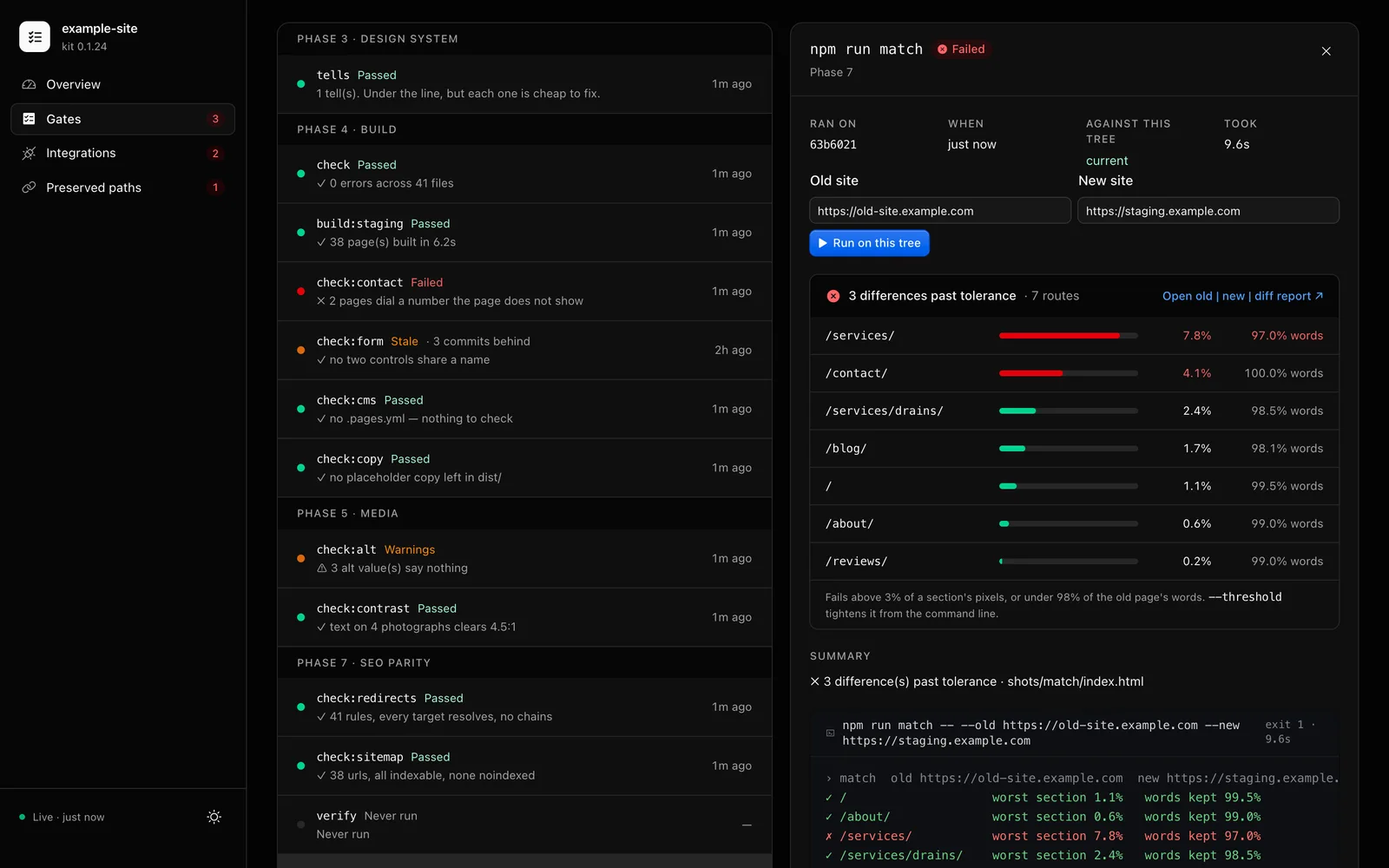
The match gate: seven routes of the rebuild compared against the old site, worst first — /services/ 7.8% of a section different, past the 3% tolerance — with a link to the old, new and diff report.
Run it beside a build
The page, at 127.0.0.1:4319
cd console && npm ci && npm start -- --site /path/to/client-siteThe same state, for Claude Code — already there with the plugin; without it
claude mcp add kit -- node /path/to/website-build-kit/console/bin/kit-mcp.mjsDeploys, search-engine submission and live-site crawls are not on its allowlist — they are absent, not hidden behind a confirmation. Bound to loopback; refuses a request from any other origin.
Also new
Detect first, ask second
The crawl sees the old site as it is today. What it cannot see — drafts, original images, the redirect table, a snippet added for last spring's campaign — recon now asks the owner for, platform by platform, with the reason on every line.
Knows what it is migrating from
WordPress with its page builder, Squarespace, Wix, Webflow, Shopify, Ghost, Drupal, Joomla, Framer — named with the evidence that gave it away, for the client to confirm.
Reads the plugins
Every WordPress plugin visible in the markup, with the data it holds and the export to ask for: SEO titles and redirects, form fields, snippets nobody remembers adding, ACF field groups.
A place for what the owner sends
client-files/ — inside the project so the build can read it, ignored by git so a backup is never committed, and refused outright on a site whose .gitignore would let it through.
45 documented
Every one of these shipped
Not hypotheticals, and not general advice. Each failed silently on a real rebuild — the compiler was happy, the deploy was clean, and nothing anywhere reported it.
A migration that dropped 15 of 18 pages
Every route the new site emitted returned 200, so verification passed. Nothing compared the new site against the old site’s inventory.
Every blog date one day early
toLocaleDateString with no timezone formats in the build machine’s zone. Correct in London, wrong in Los Angeles, same commit.
Moving the apex killed the client’s email
MX left behind in the old zone. Bounces go to the sender, so the people who find out cannot tell the client.
A bare CI build published localhost canonicals
No environment set, no error, no warning. The bundler ran perfectly and the site told Google it lived on localhost.
The last client’s analytics on a new site
An inherited container ID in the template sent a real business’s traffic to another company’s property, for weeks.
A skip link that scrolled but never moved focus
The page jumps, so it looks like it worked. Keyboard users land back in the navigation.
Disallow: / and noindex cancelling out
A blocked crawler never fetches the page, so it never reads the noindex — and the staging URL gets indexed anyway.
A mega-menu compared closed against closed
The parity check hovered the menu and measured its toggle button instead of the panel. A menu that lost a whole column passed at 0%.
Get started
Connect it where you work
Claude Code builds the site. The page in a browser and Claude Desktop watch the same build and run its checks. All three read the same site, and you can run them side by side.
Claude Code, in the terminal
The skill and the console's tools in one install. Nothing to configure.
- Install the plugin, inside Claude Code:
/plugin marketplace add nurkamol/website-build-kit/plugin install website-build@website-build-kit - Make a site, or use one you have. Inside an empty folder, use
.for the name:npm create website-build-kit@latest my-site - Start Claude Code in the site's folder — that is the site it reads:
cd my-site && claude /mcplists the kit's server as connected.- Ask: "Rebuild https://acmeplumbing.com on Astro", or "Where does this build stand?"
The console, in a browser
Phase, gates, blockers and match, for a person. On your machine only.
- Get the kit:
git clone https://github.com/nurkamol/website-build-kit.git - Install the console, once:
cd website-build-kit/console && npm ci - Start it, pointed at a site:
npm start -- --site /path/to/your-site - Open
http://127.0.0.1:4319. Run a gate from its row; one Claude Code runs shows up live.
Claude Desktop
The console's tools in a Desktop chat. One file — and a terminal once, for the first setup.
First time only, in a terminal
Node 22.19+ (node --version), and the site itself — or an empty folder from 0.2.2, where Claude makes it for you.
npm create website-build-kit@latest my-site- Download the extension:
- Double-click it, and click Install in Claude Desktop. Its unverified-extension warning appears for every extension.
- Click Configure, then Browse to the site's folder (the one holding
BUILD-STATE.md, not the kit's own), then Save. - Ask in a new chat: "Where does the build in my site stand?" From 0.2.2, in an empty folder: "Make the site here."
Node and npm must stay installed — gates and making a site use them. nvm, Volta, Homebrew and the official installer are found on their own.
The template
A skeleton, not a theme
It ships no palette, no typeface and no home page — deliberately, so that two sites built from it cannot look alike. What it does ship is the part that takes longest to get right and is easiest to get subtly wrong.
In the box
- Form endpoint with durable storage written before the email provider is called
- One build variable deriving indexability, analytics, canonical host and lead routing
- Verification against the deployed site, as a gate that exits non-zero
- WCAG 2.2 AA as a build constraint, with a dated evidence pack
- Migration path: inventory, extract to markdown, propose redirects, fail on a lost URL
- AVIF and WebP per width, with a manifest so nothing shifts
Deliberately absent
- A palette, a typeface, a home page or a hero treatment
- A component library or a design system
- A CMS — one gets picked per project, not per template
- Testimonials, pricing tables and galleries; those are project-shaped
- Any provider recommendation that has not shipped on a real deploy